Auto-renewal
Auto-renewal authorizes the platform, as the membership period nears its end, to deduct the next period's membership fee from the account's available wallet balance. It is not a direct debit from a bank card or third-party payment account, and it is not a manual renewal.
Conditions
The current official agreement applies auto-renewal only to users who simultaneously:
- Have opened and topped up the platform wallet.
- Have successfully purchased a paid membership (monthly, yearly, etc.).
- Have chosen to enable auto-renewal.
- Have read and accepted the auto-renewal agreement and related agreements.
The agreement takes effect when you select Agree or Enable auto-renewal. Before enabling, verify:
| Item | What to confirm |
|---|---|
| Current account | Membership and wallet belong to the same account or organization being renewed |
| Membership plan | Plan name, current period, expiry, next-period benefits |
| Wallet balance | Available balance covers the next period's fee |
| Renewal price | Current published price for the next period; may differ from first-period promo pricing |
| Charge window | 24–48 hours before expiry; exact time follows system execution |
| Auto-renewal status | The page explicitly shows enabled—not just a completed purchase |
| Linked agreements | Auto-renewal agreement, terms of service, membership refund rules |
Checking Auto-renew at expiry in the subscription confirmation means agreeing to the auto-renewal service agreement and authorizing the platform to charge automatically at expiry via the currently published channel.
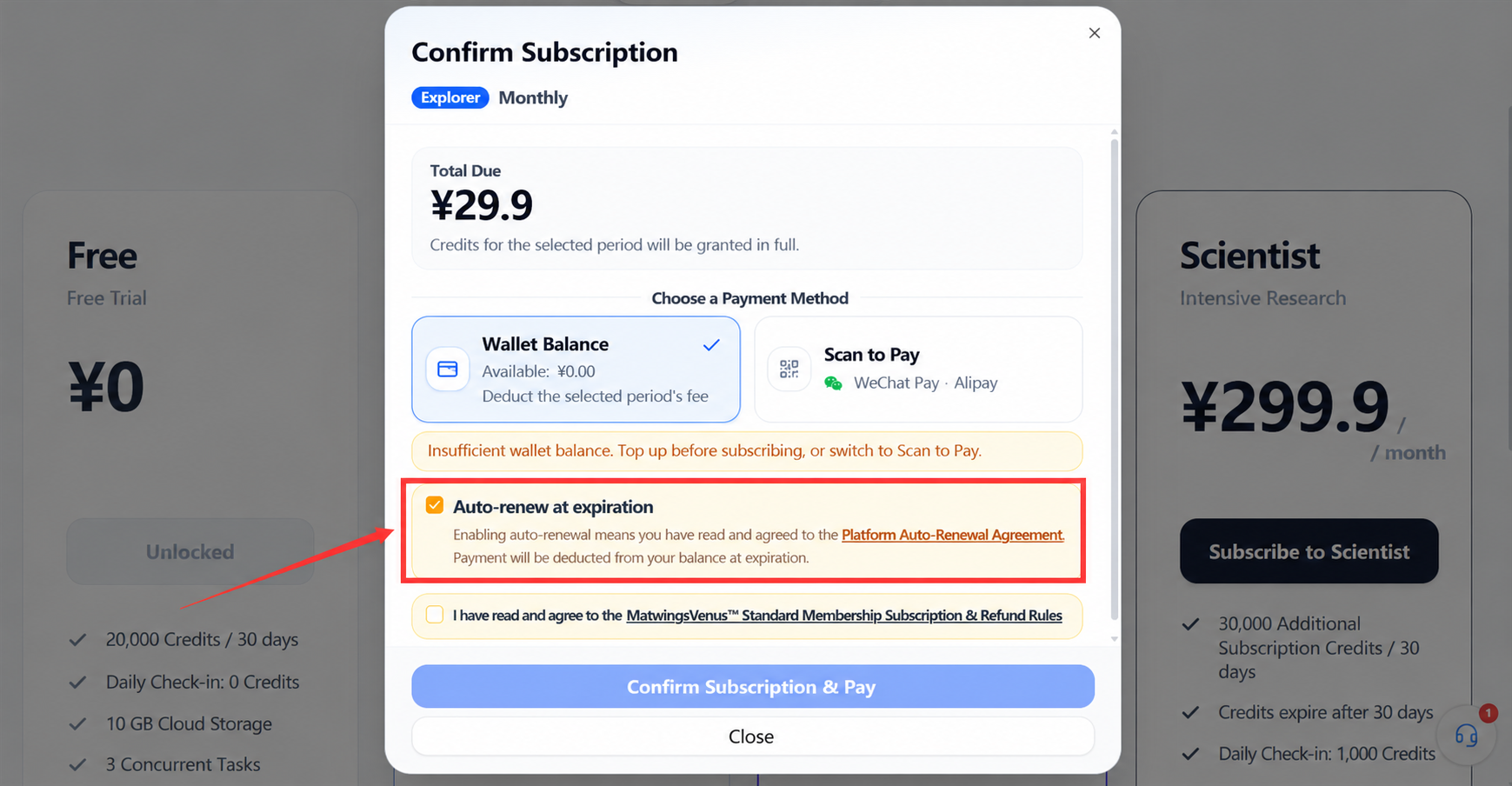
The platform charges proactively once enabled
The agreement treats enabling as authorization to charge. Do not check only whether membership is active—check the auto-renewal switch and wallet balance; if you do not intend to continue, cancel before the system initiates the next charge.
Charge timing and channel
Timing
The current agreement: the platform initiates the charge 24–48 hours before each membership period ends; exact timing follows system execution. Times in the membership center, renewal notices, and emails use Beijing time—plan cancellations or top-ups against your local time accordingly.
Therefore, when cancelling or adjusting the wallet, do not treat the expiry moment as the deadline. Near expiry, first check the next charge time and auto-renewal status in the membership center.
Amount
Each renewal charges the next period's fee at the rate published on the purchase page at that time. The agreement specifically notes:
- First-period promo prices may differ from renewal prices.
- The platform may adjust renewal prices.
- When adjusting rates, the platform gives at least 7 days' notice on the platform or via registered contact.
- New rates apply from the next renewal period.
- If you disagree with a new price, cancel auto-renewal before the charge.
This manual records no fixed plan prices and does not infer the next charge from the first payment.
Channel
The current agreement states:
- Auto-renewal charges only the platform wallet balance.
- No direct charge from bank cards or third-party payment accounts.
- With held or locked funds in the wallet, the actually available balance governs.
A successful charge extends membership by one period. A failed charge may end membership after the current period; the platform may remind via SMS or in-site message, but you are still responsible for checking membership and wallet status.
Cancel auto-renewal
The current agreement: cancel anytime via Membership center → Auto-renewal management.
Suggested steps:
- Sign in to the account being cancelled.
- Open My subscription.
- Verify the plan, expiry, and auto-renewal status.
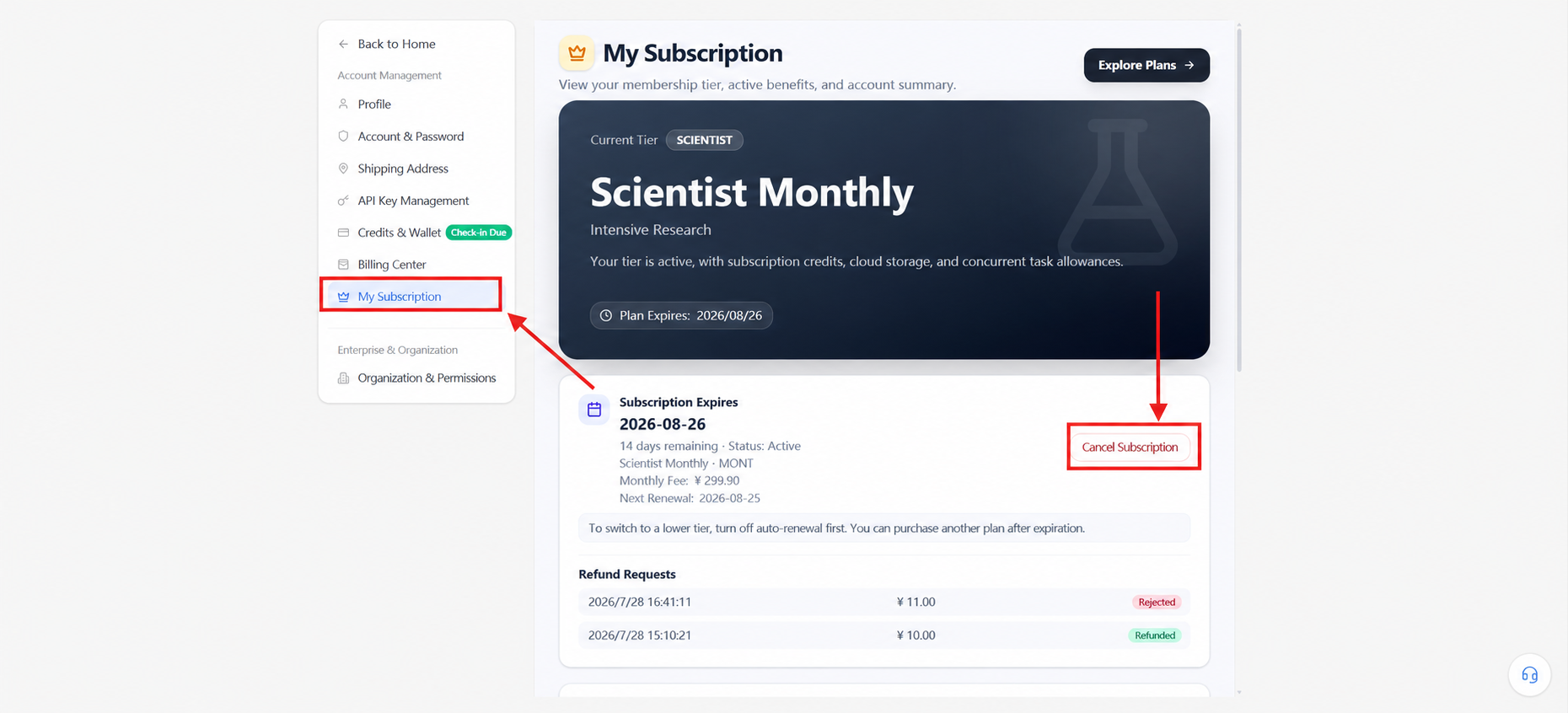
- Select cancel or turn off auto-renewal.
- Read when the cancellation takes effect and the current-period benefit notes.
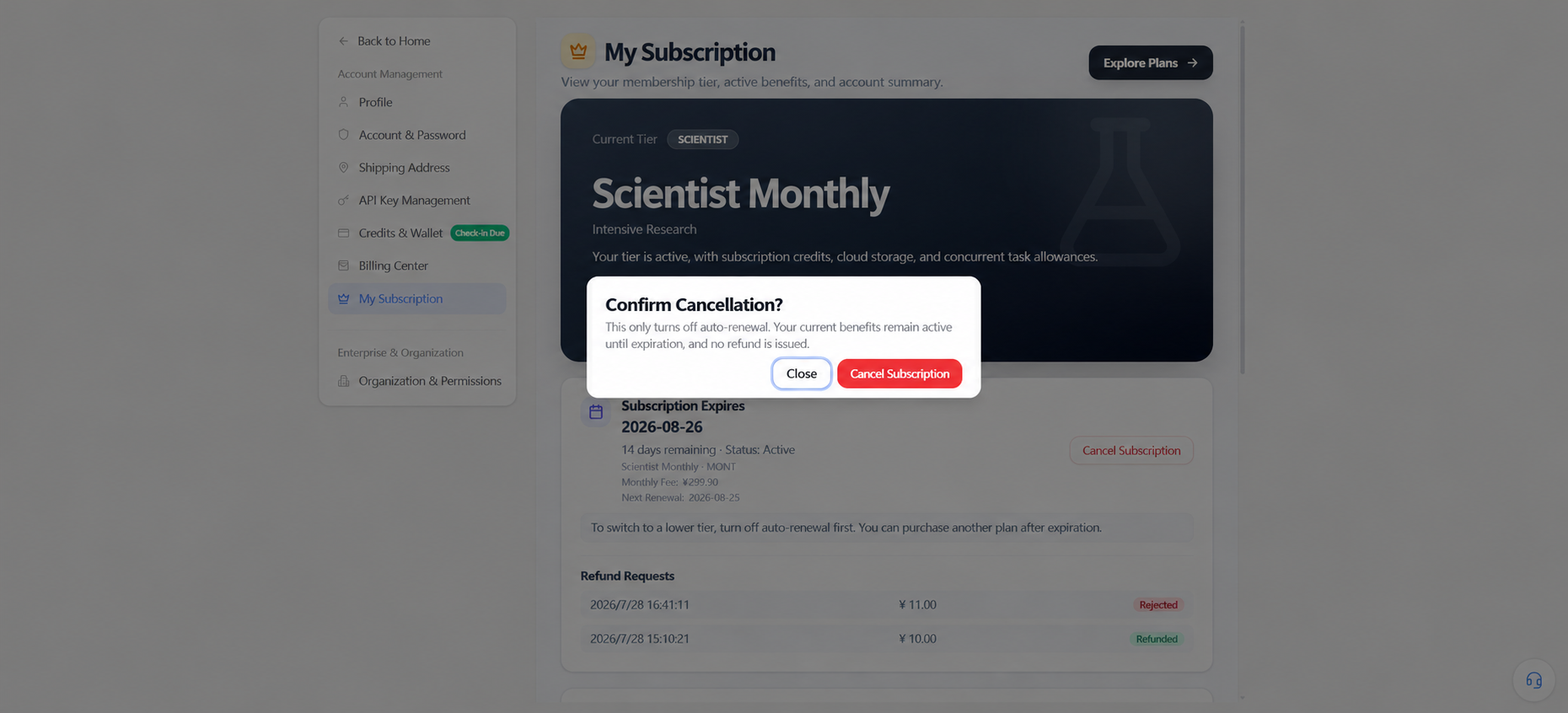
- After confirming, re-check that the status shows cancelled or off.
- Save a desensitized record of the result and time.
Cancelling membership is not cancelling auto-renewal
Turning off auto-renewal prevents the next automatic charge; it does not refund the current period immediately or terminate already-paid benefits. For mid-term cancellation or refunds, see Membership, subscription, and refunds.
Insufficient balance
Under the current agreement, if the wallet balance cannot cover the next period's fee at charge time, the charge does not execute and auto-renewal stops immediately; the platform has no obligation to retry or chase payment. Membership ends naturally after the current period; to continue, top up and re-enable.
The agreement text uses both "balance less than the payable fee" and "balance <= the charge amount". To avoid boundary ambiguity, do not leave the available balance exactly equal to the renewal amount; rely on the membership center's prompts, the available balance, and the platform's execution.
On insufficient balance:
- Check the failed-charge status and current expiry in the membership center.
- Check the wallet's available balance and held or locked funds.
- Check wallet transactions to confirm no successful charge occurred.
- Confirm auto-renewal has stopped.
- To continue, top up per the current page and re-enable auto-renewal.
- Re-check the membership effective time; do not assume a later balance top-up triggers an automatic retry.
Topping up later does not trigger a retroactive charge
The agreement is explicit: after an insufficient-balance stop, the platform need not retry. Topping up does not automatically restore membership or auto-renewal—redo the steps on the page and confirm the status.
Other stop conditions
Beyond insufficient balance and user cancellation, the agreement lists:
- Wallet frozen.
- Account closed or restricted.
- Membership plan already expired and cleared.
- Account in violation or banned by the platform.
- Platform discontinuing auto-renewal for all or some users.
Platform-initiated termination normally comes with 30 days' notice by announcement or in-site message; termination required by law, regulation, or force majeure may shorten the notice or follow with a post-hoc announcement.
FAQ
| Situation | How to check |
|---|---|
| Charged before expiry | The agreement allows charging 24–48 hours early; check the charge time and next period |
| Renewal price differs from first period | Check the current purchase-page rate and price-change notices; first-period promos do not set renewal prices |
| Wallet has funds but charge failed | Check actually available balance, held or locked funds, and the insufficient-balance stop notice |
| Topped up but still not renewed | No retroactive charge after an insufficient-balance stop; confirm whether re-enabling is needed |
| Cancelled but membership still active | Cancellation applies to the next period; paid benefits run to expiry |
| Charged despite believing it was cancelled | Check the cancellation completion time, the charge window, and the page state after cancelling |
| Failure notice but membership still active | The current period may not have expired; check the actual expiry and auto-renewal status |
| Charged but membership not extended | Verify wallet transactions, the subscription order, and the expiry; do not pay again |
In disputes, save desensitized screenshots of:
- Auto-renewal enabled or cancelled status.
- Membership plan and expiry.
- Charge or cancellation time.
- Wallet transaction status.
- Price-change or charge notices.
Provide necessary order identifiers through official support channels; never send passwords, SMS codes, payment passwords, full card numbers, wallet balances, or payment QR codes.
Related agreements
The auto-renewal agreement supplements the terms of service and the standard membership subscription and refund rules. Read together before acting:
- Membership, subscription, and refunds
- Account, credits, and subscription overview
- Earning and using credits
- Terms of service
- Standard membership subscription and refund policy
The agreement takes effect when you select Agree or Enable auto-renewal. This summary does not replace the full agreement; where the page rules differ, the currently effective agreement and actual account status govern.