Antibody services
Antibody services take one or more amino acid sequences and configure starting material, expression system, protein quality requirements, characterization methods, and downstream applications. The current page uses a manual inquiry flow—after the order is created, the commercial team confirms the quote with you.
Open the antibody services form
- After signing in, open wet-lab services from the left of the agent workbench.
- Find Antibody services.
- Select Order now.
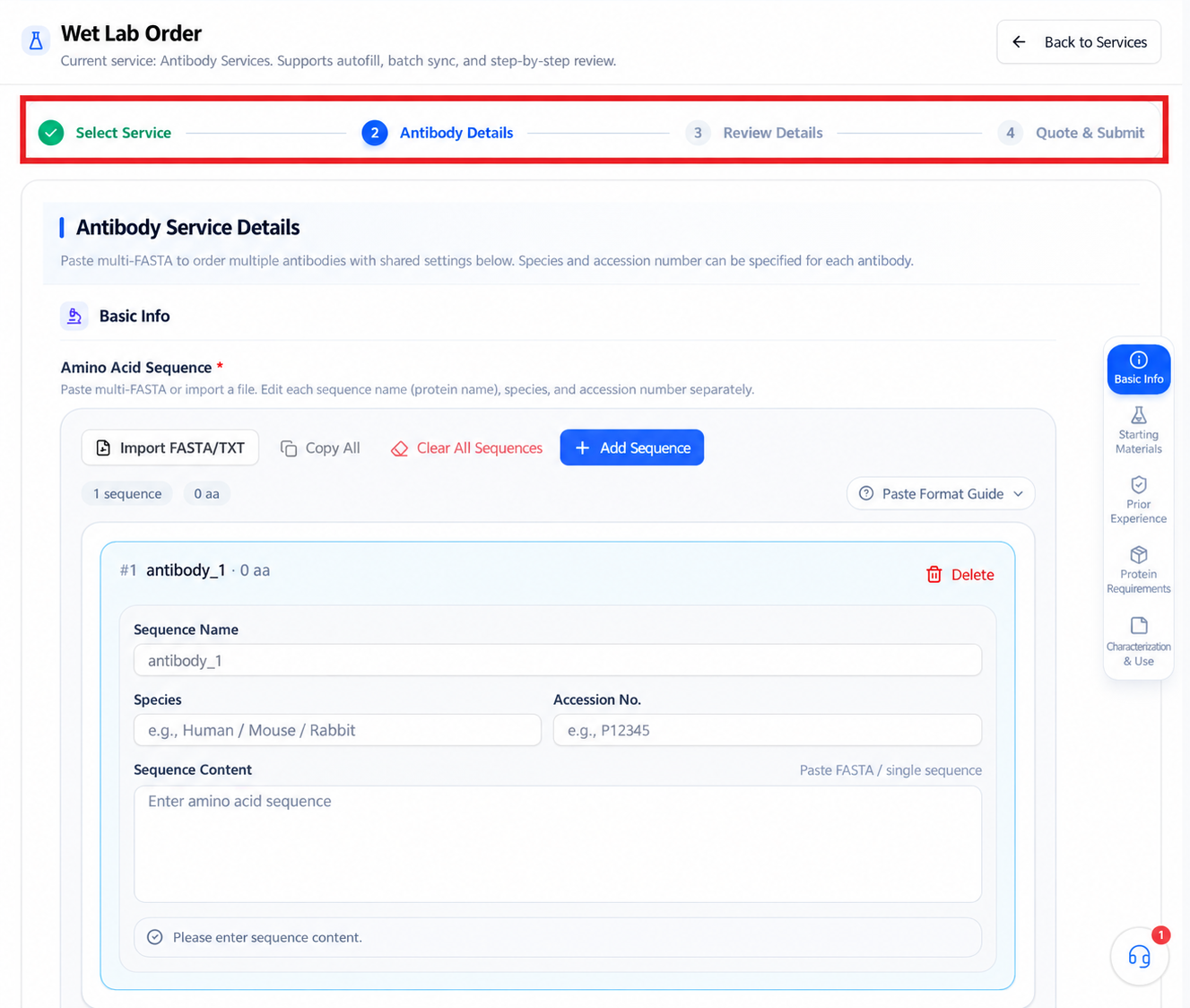
The top of the page shows four stages:
Before you start
| Information | What to prepare |
|---|---|
| Amino acid sequences | Complete sequence and version for every antibody or related protein |
| Sequence identity | Sequence name, species, and available accession numbers |
| Starting material | Whether gene synthesis is needed; whether a vector is specified |
| Expression system | E. coli, yeast, insect cells, mammalian cells, etc. |
| Prior experience | Expression attempts, known issues, and downstream plans |
| Protein requirements | Quality needed, expression volume, purity, concentration, endotoxin |
| Tags and buffer | Fusion tags, tag removal, refolding, and buffer requirements |
| Characterization and use | Characterization methods and downstream applications |
Before submitting, confirm you hold upload and usage rights for the sequences, experimental material, and application information.
Add amino acid sequences
The Basic information area supports:
- Importing FASTA/TXT files.
- Pasting multi-FASTA or a single sequence.
- Add one for entry one by one.
- Copying all sequences.
- Clearing all sequences.
Each sequence has its own fields:
- Sequence name—the protein name on the page.
- Species.
- Accession number.
- Amino acid sequence content.
For multi-FASTA, the text after > is the sequence name. After import, check every entry's name, species, ID, length, and content.
Multiple antibodies share the project configuration
The page states explicitly: multi-FASTA can order several antibodies at once, but they share all project configuration below. Only sequence name, species, and accession number are per-sequence. If different antibodies need different systems, purities, tags, or application conditions, split the order or confirm with the platform first.
Configure starting material and expression system
The Starting material & expression system area contains:
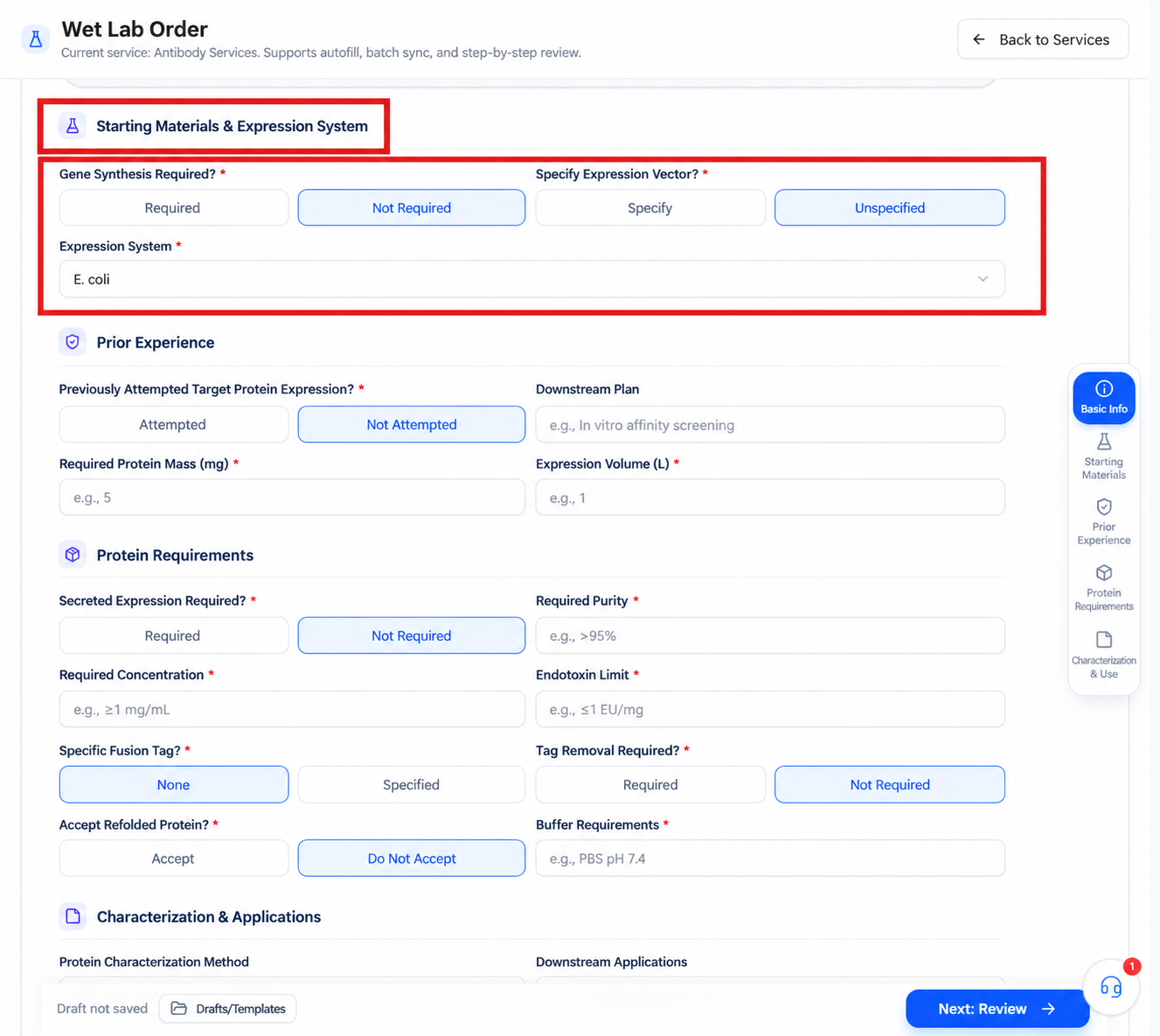
Choose the expression system with folding, glycosylation, secretion, yield, cost, and downstream use in mind. No specific requirement does not mean the platform picks the optimal system—confirm the recommendation and its rationale during the manual inquiry.
If specifying a vector, prepare the exact vector name, tags, resistance, map, and any archive information.
Describe prior experience
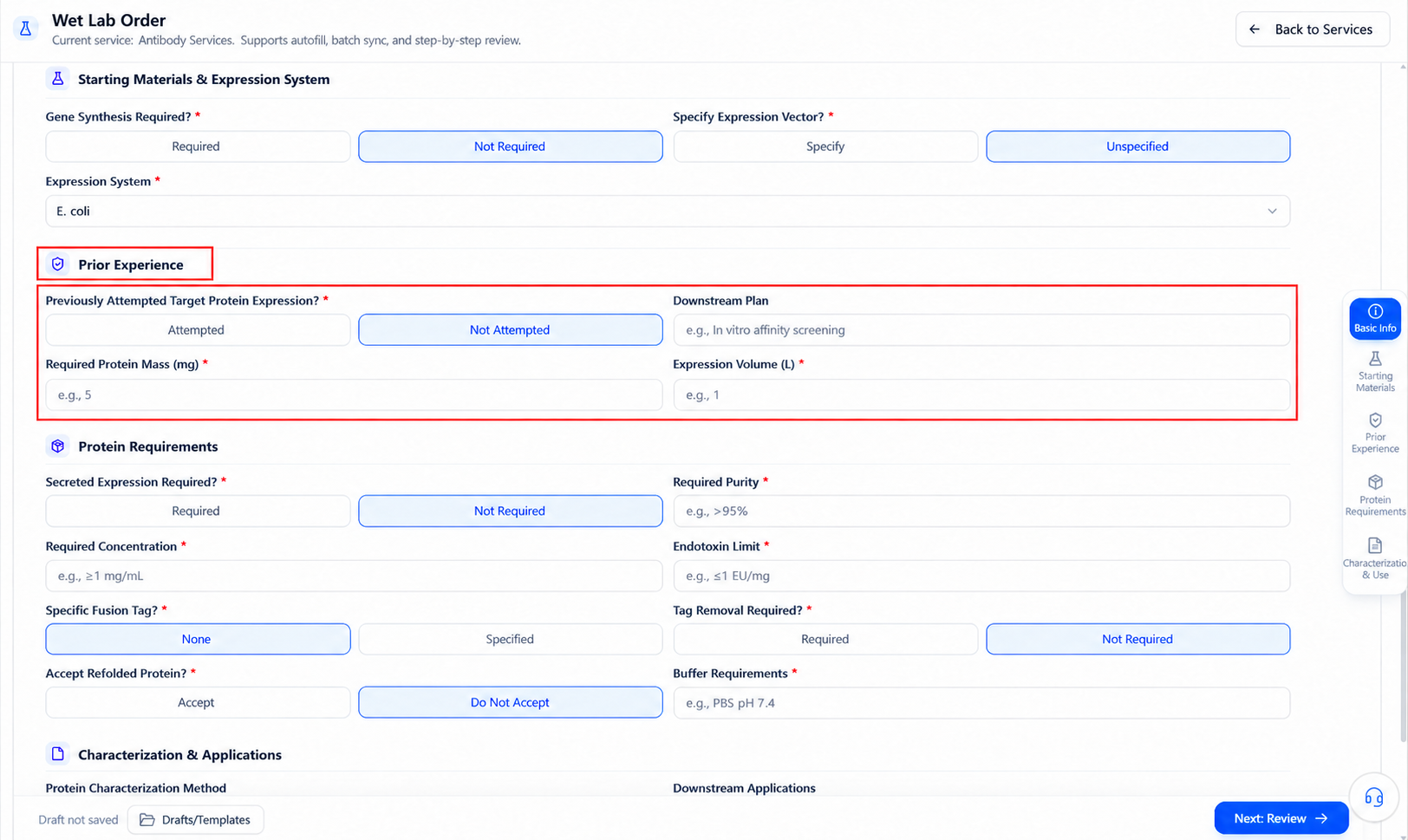
If expression has been attempted, describe:
- Hosts and vectors used.
- Expression temperature, induction conditions, and culture scale.
- Solubility, inclusion body, or secretion outcomes.
- Problems during purification.
- Existing assay results and raw data.
Downstream plans should state what the protein will be used for, such as in vitro affinity assays, animal immunization, or other functional experiments. This affects quality and buffer requirements.
Set protein requirements
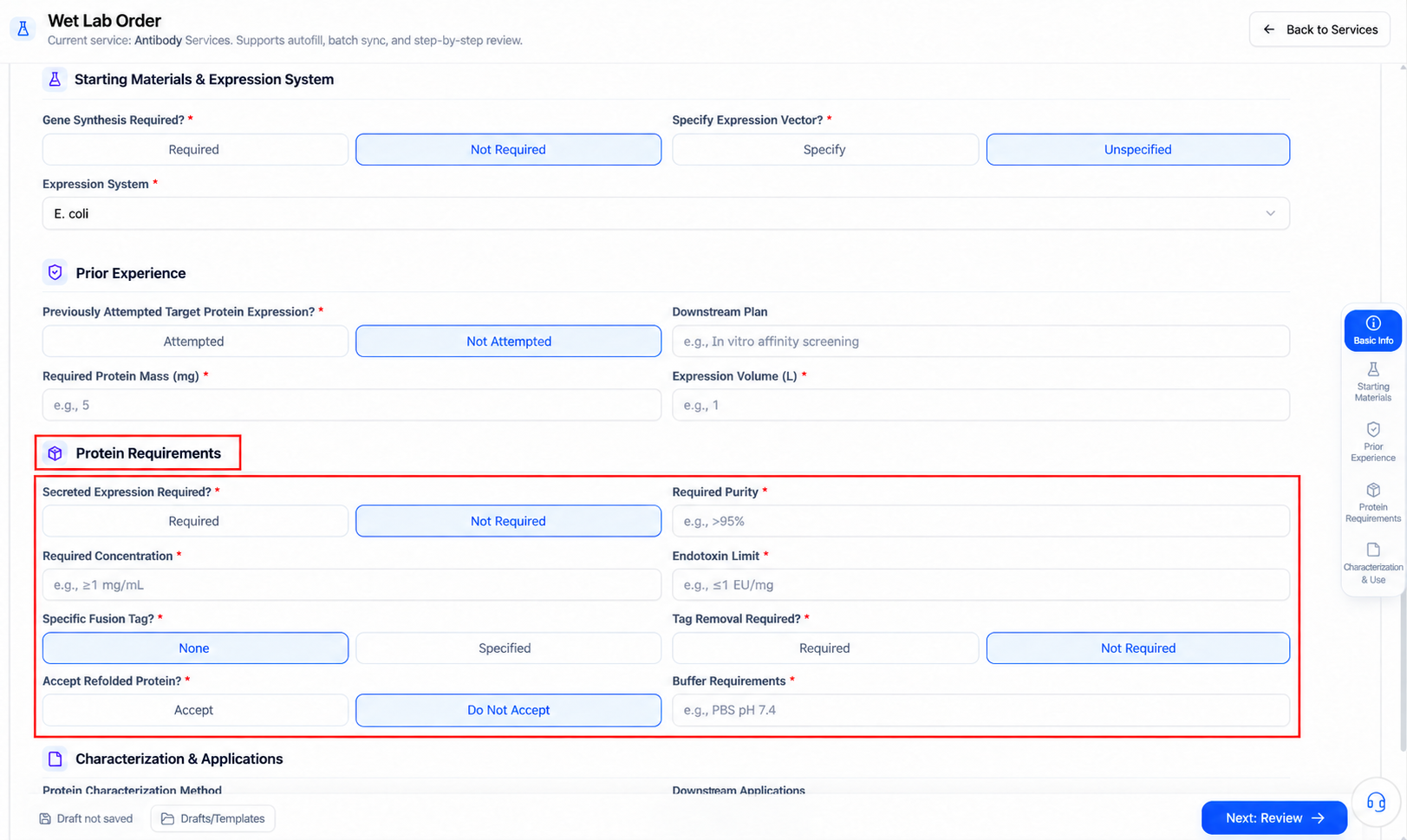
The Protein requirements area contains these required fields:
| Field | How to fill in |
|---|---|
| Secreted expression needed | Choose per the expression system, protein properties, and purification plan |
| Purity requirement | An acceptable target value plus the assay method |
| Concentration requirement | State unit and allowed range together |
| Endotoxin requirement | Set per in vitro, cell, or animal use |
| Fusion tag | Choose None if unspecified; otherwise state type and position |
| Tag removal | Consider the cleavage site, residual tag, and purification plan |
| Refolding accepted | Judge against activity and folding requirements |
| Buffer requirement | Composition, pH, salt, and necessary additives |
Do not enter bare numbers. Purity should say %, concentration mg/mL, endotoxin its unit and applicable scenario. Page examples are not default acceptance criteria for your project.
Set characterization methods and applications
The bottom of the page provides:
- Protein characterization methods: e.g. SDS-PAGE, Western Blot, or other agreed methods.
- Downstream applications: e.g. in vitro binding assays, animal immunization, or other functional studies.
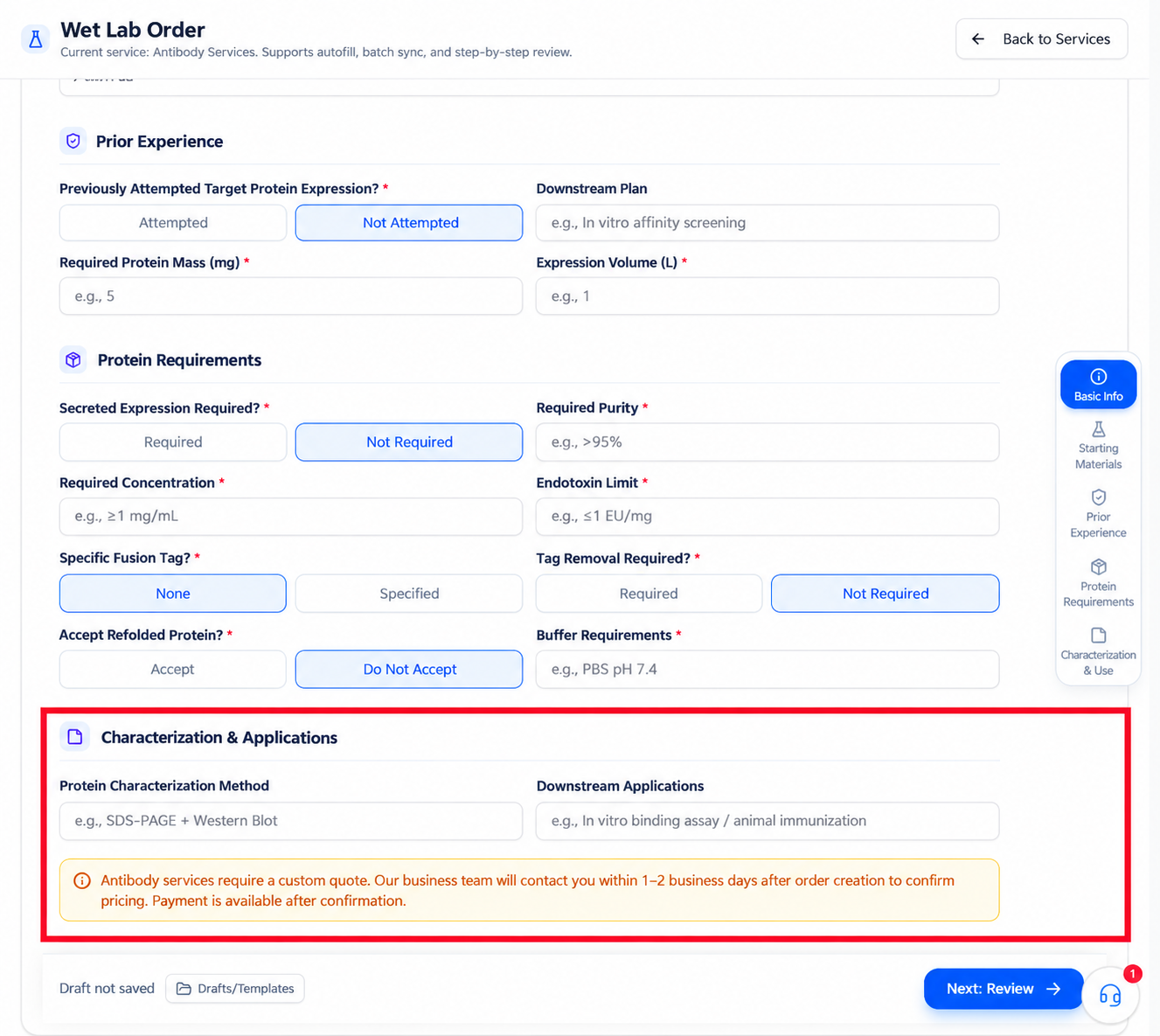
Characterization must match the acceptance goal. SDS-PAGE alone cannot prove expected binding activity; if the project needs functional validation, make clear during the inquiry whether it is included and by which method.
Downstream use drives endotoxin, buffer, tag, concentration, and sterility requirements. Do not add key application conditions only after submission.
Drafts and templates
The bottom offers Draft/template and shows the current draft state.
- After using a template, re-check all shared configuration.
- Confirm the draft is saved before leaving.
- A draft only continues your entry—it is not an order or a locked quote.
- When switching to another antibody project, do not reuse the old draft's quality and application parameters.
Enter information confirmation
After all required fields, select Next: information confirmation; when the summary is correct, select Enter quote.
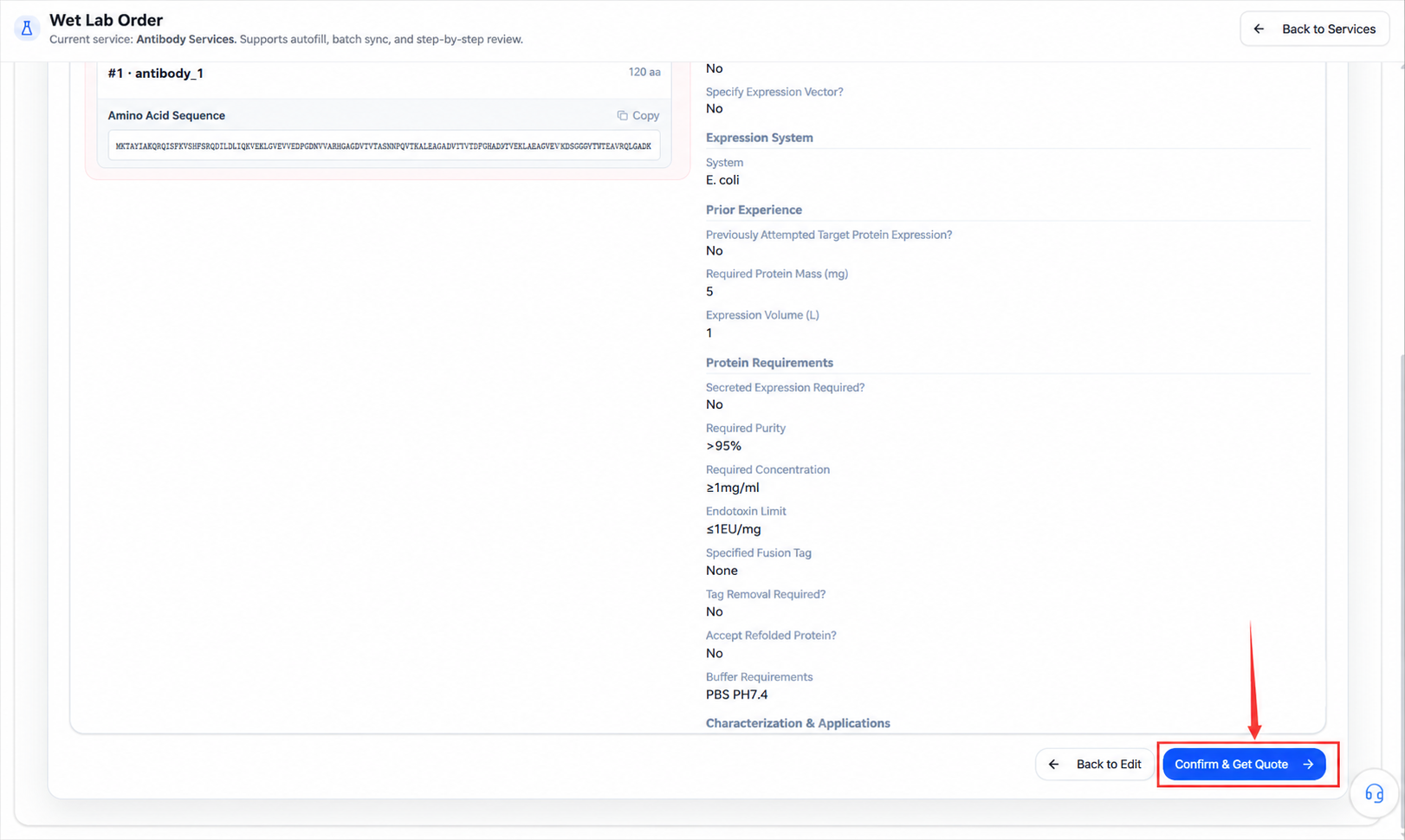
Check item by item:
- Number of sequences, names, species, accession numbers, and full content.
- Whether the sequences truly share one set of configuration.
- Gene synthesis, vector, and expression system choices.
- Prior expression experience and downstream plans.
- Quality, volume, secretion, purity, concentration, and endotoxin requirements.
- Tags, tag removal, refolding, and buffer requirements.
- Characterization methods and downstream applications.
Fix inconsistencies before entering the quote.
Manual inquiry and submission
The page currently notes: antibody services orders use manual inquiry; after the order is created, the commercial team will contact you within 1–2 business days to confirm the quote, and payment follows confirmation.
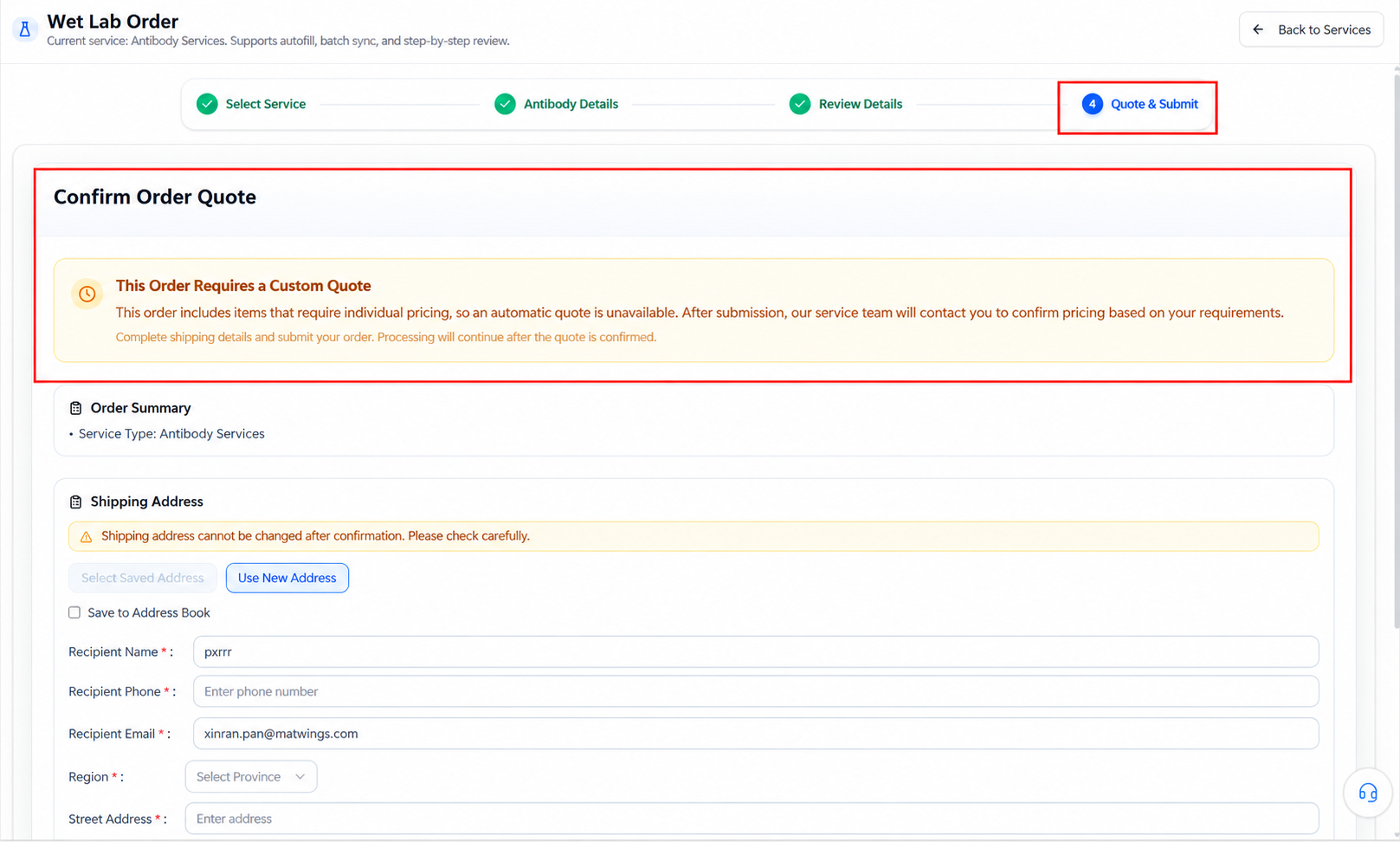
1–2 business days is the contact time shown on the page, not the experiment delivery cycle. Actual scope, price, payment terms, and delivery time follow the final quote and mutual confirmation.
Before creating the order
Reaching information confirmation is not formal submission. Creating the order produces a real business record; before submitting, confirm every sequence can share the current project configuration and that the manual quote covers the expression, purification, QC, and functional testing you need.
Troubleshooting the form
| Situation | How to check |
|---|---|
| Sequence fails validation | Check it is an amino acid sequence, without illegal characters or empty records |
| multi-FASTA entries mixed up | Check every > header, sequence name, species, and accession number |
| Multiple antibodies need different conditions | Split the order or confirm with the platform before submitting |
| Cannot enter confirmation | Look for fields marked * and complete numeric fields |
| Unsure of the expression system | Fill in experience and application goals; ask for advice during the inquiry |
| Quality requirements not quantifiable | Add units, assay methods, and acceptance ranges |
| Quote lacks functional validation | Pause confirmation; settle characterization and application, then re-check |
| Standard form cannot express the need | Use other custom services or contact the platform |
For order status and handling after creation, see Order workflow and status.