Booking and consultation
Expert services currently work through manual support. Selecting Book a consultation on an expert card does not create a booking or show time slots or a payment form; it opens a Contact support dialog. You add the WeCom support contact by scanning a QR code with WeChat, then discuss expert matching, the consultation question, availability, and service terms.
This page covers preparing the consultation, opening the QR code, and confirming key items during communication. For finding and comparing experts, see Find the right expert.
Prepare the question and material
Before contacting support, shape the research question into something judgeable and answerable.
| Information | What to prepare |
|---|---|
| Subject | Protein, sequence, structure, ligand, experiment system, or project stage |
| Current problem | The specific item to assess, explain, optimize, or troubleshoot |
| Existing basis | Database IDs, public literature, computational results, shareable records |
| Methods tried | Models, tools, parameters, or conditions used, with results |
| Key constraints | Samples, equipment, materials, time, budget, or methods to avoid |
| Desired outcome | Plan review, risk list, candidate ranking, experiment advice, or anomaly analysis |
| Availability | Dates, time windows, and time zone |
Organize the question as:
Subject:
Current goal:
Data and methods tried:
Problem encountered:
Three things the expert should judge first:
Constraints:
Expected output:
Do not send only "take a look at this protein" or "the experiment failed". Without a subject, input conditions, and expected output, support cannot judge which expert to match.
Send a summary first, confirm intake before sharing data
For first contact, provide only a desensitized summary. Before sending internal sequences, unpublished data, client material, or project files, confirm how material is received, its usage scope, and confidentiality.
Start a booking
- Sign in to MatwingsVenus® and select Expert consultation on the left.
- Use level, field, keywords, and profiles to find candidates.
- Select Book a consultation on the target expert's card.
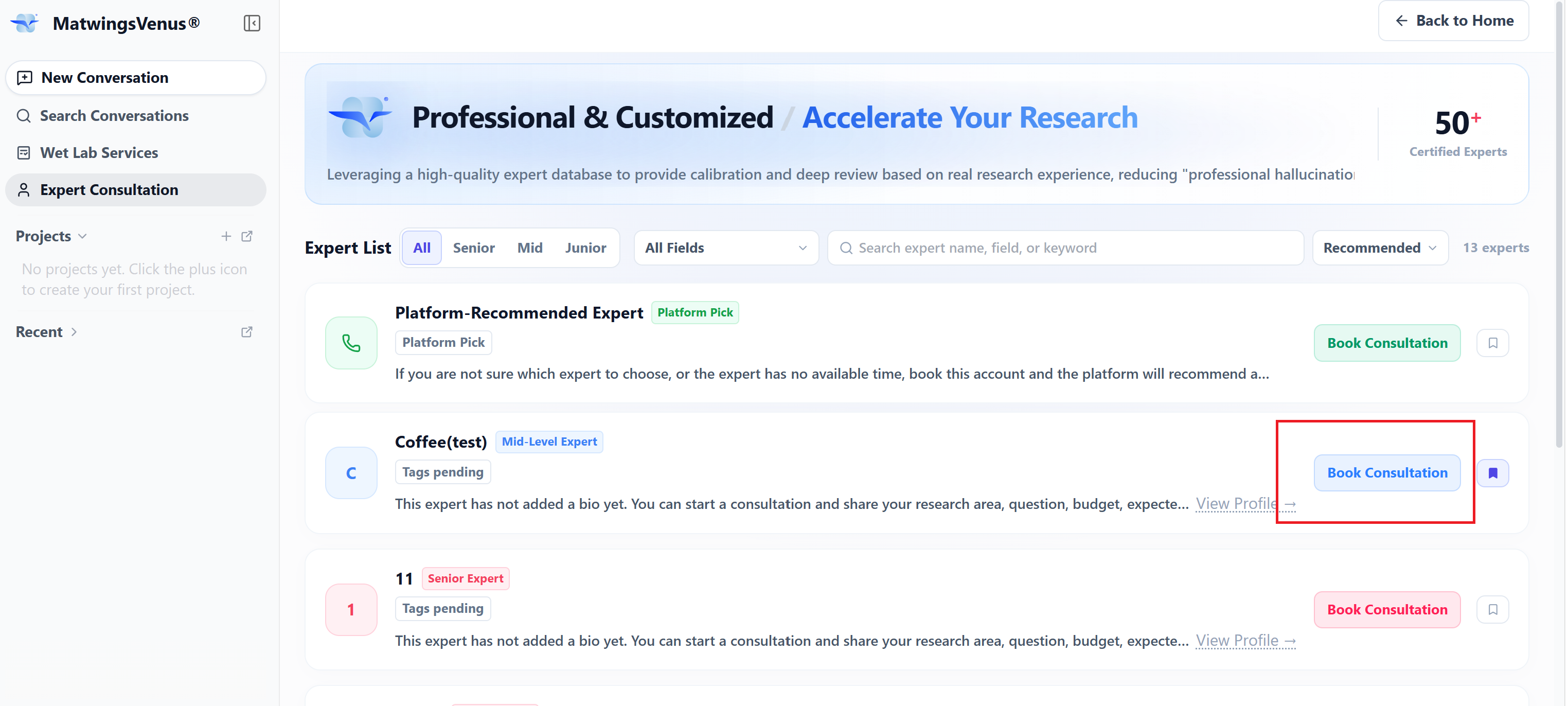
Both regular experts and Support-recommended expert offer Book a consultation. With a chosen expert, use their card; when unsure or unavailable, choose Support-recommended expert.
After selecting it, the Contact support dialog opens.
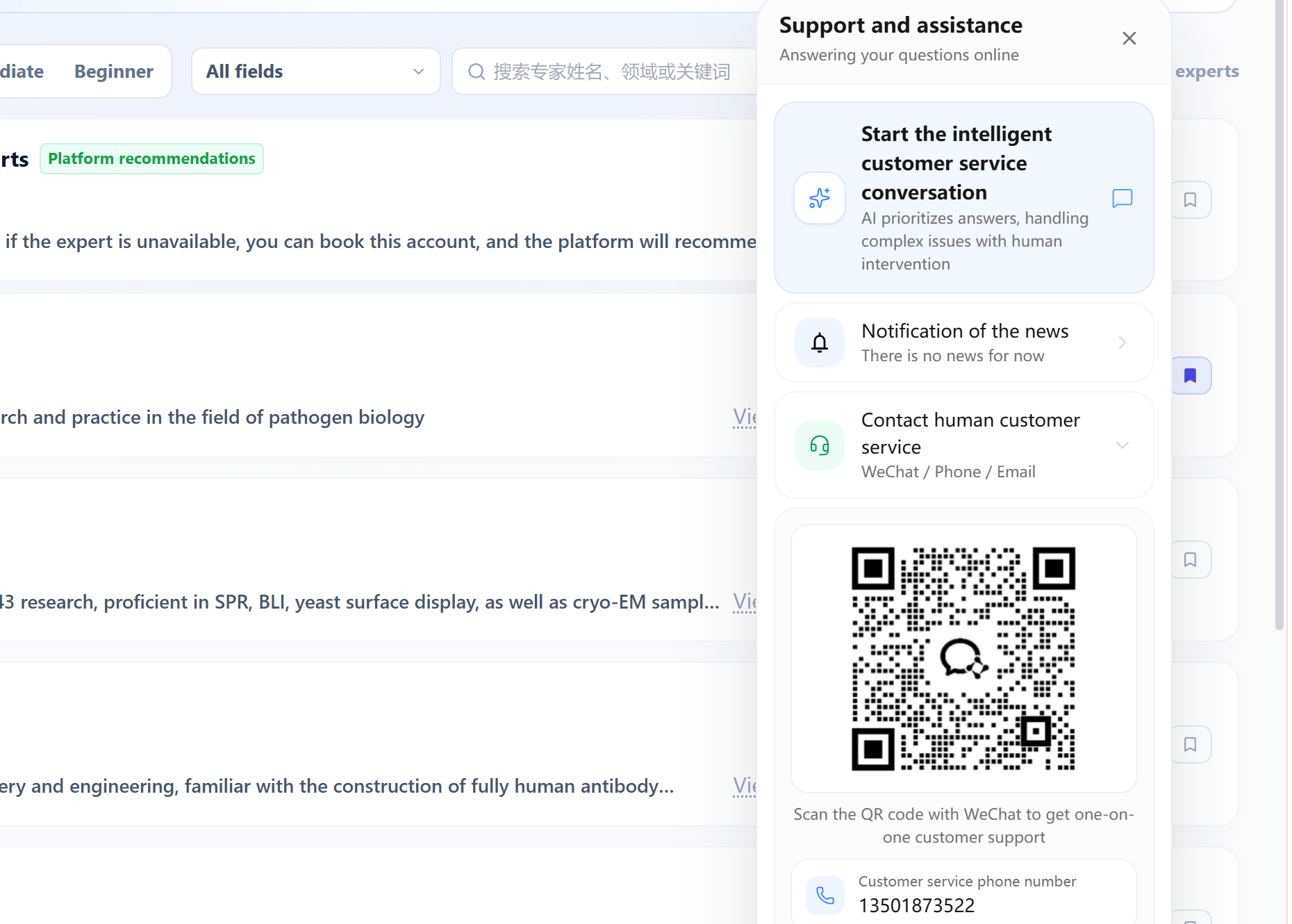
Scan the QR code with WeChat and add the WeCom support contact. Scanning and adding do not confirm a booking and do not automatically create a consultation order on the page.
No online booking form currently
The current page provides no date picker, time slots, consultation form, or online payment. Follow-up arrangements are made with support; the actual flow is as support confirms and the page shows.
Confirm timing, fees, and service terms
After adding support, send the prepared question summary first and state the expert or direction you want. Do not send all sensitive material at once before scope is settled.
Before confirming, verify at least:
- Expert: the final counterpart is the listed expert or another recommended by support.
- Topic: the questions this consultation will and will not cover.
- Format: message-based consultation, online meeting, or another channel support offers.
- Timing: date, start time, expected duration, and time zone.
- Fees and payment: fee basis, included services, payment method, and invoicing.
- Material scope: which files are needed beforehand and through which channel.
- Expected output: verbal advice, meeting minutes, written opinion, or another agreed result.
- Adjustment rules: rescheduling, cancellation, expert unavailability, or incomplete material.
Prices, duration, and terms vary by expert and question type. This manual records no fixed amounts; support's final confirmation governs.
Consolidate the confirmed items into one record:
Expert / direction:
Topic:
Time and time zone:
Format:
Service scope:
Material to prepare:
Fees and payment:
Expected output:
Reschedule or cancellation rules:
Attend the consultation
Before it starts:
- Check the meeting or communication entry opens.
- Prepare the question list, most important first.
- Open the confirmed versions of your material—avoid sending wrong files on the spot.
- Check consistency of sequence names, database IDs, chart units, and conditions.
- Confirm whether recording, screenshots, or verbatim notes are allowed.
During the consultation, separate three kinds of content:
| Content | What to note |
|---|---|
| Known facts | The matching database, literature, or experimental source |
| Expert judgment | Rationale, applicability, and uncertainty |
| Follow-up advice | Priority, input conditions, validation method, and stop criteria |
If understanding diverges, first re-confirm the subject and goal before diving into plan details. When predictions are discussed, ask the expert to mark which conclusions have direct evidence and which are experience or hypotheses to validate.
Consolidate the results
Soon after the consultation, write down:
- Confirmed facts and data sources.
- The expert's main judgments on the current plan.
- Risks and inapplicable conditions to exclude.
- Recommended next steps in priority order.
- Material or experiments still missing.
- Owners and expected review dates.
Map key advice to "basis—action—validation standard". For example:
| Advice | Basis | Next step | Success criterion |
|---|---|---|---|
| Adjust candidate screening conditions | Current candidates lack a required structural feature | Re-screen and keep original results | New candidates meet the pre-agreed structural conditions |
| Change the expression plan | Solubility problems in the current system | Compare alternative hosts or constructs | Evaluated by the jointly confirmed assay |
Expert opinions should not be rewritten as verified scientific conclusions. For experiments, move to wet-lab services under the confirmed plan; for further computation or retrieval, return to the agent workbench.
Cancellation and exceptions
Bookings are confirmed through manual support, so rescheduling, cancellation, and exceptions also go through the original contact—keep the confirmed records.
| Situation | Suggested handling |
|---|---|
| QR code unrecognizable | Refresh the page, reopen the dialog, check WeChat version and network |
| Add did not go through | Confirm the WeCom add step completed; rescan if needed |
| Unsure which expert | Use Support-recommended expert; send the summary and desired direction |
| Target expert unavailable | Ask about alternative times or same-direction experts; do not submit duplicate bookings |
| Need to change the time | Contact the original support early with the old arrangement and new windows |
| Consultation content changed | Update the summary, material scope, and expected output before confirming |
| Cannot attend | Follow the reschedule or cancellation rules support confirmed |
| Doubts about fees or scope | Pause payment or confirmation; ask for a restatement of included and excluded work |
| Records inconsistent afterwards | Compare with the original question and communications; list differences and confirm |
Scanning the code is not a confirmed booking
A consultation may proceed as agreed only after the expert, timing, format, fees, material scope, and service terms are all explicitly confirmed. Do not treat scanning, adding support, or sending a question as an established booking.