Ask questions and upload files
The agent executes tasks based on the question, attachments, and current conversation context. Before submitting, be clear about the subject, task goal, and result requirements; when using your own data, also state the purpose of each attachment in the question.
Write an actionable question
A complete question usually contains:
subject + task goal + scope and constraints + content to return + output format + evidence requirements
For example:
Retrieve all known human receptor proteins that bind CXCL12 with high affinity, and summarize their UniProt IDs, subcellular localization, tissue expression, downstream signaling pathways, and disease associations. Present the results in a table, distinguishing experimentally validated from predicted information.
| Component | In the example |
|---|---|
| Subject | Receptor proteins of CXCL12 |
| Task goal | Retrieve and summarize known receptors |
| Scope and constraints | Human, high-affinity binding |
| Content to return | UniProt, localization, expression, pathways, and disease associations |
| Output format | Table |
| Evidence requirements | Distinguish experimentally validated from predicted information |
If an item is undetermined, explicitly ask the agent to list the information it needs instead of letting it assume key experimental conditions.
Turn vague requests into clear tasks
| Too vague | Recommended wording |
|---|---|
| Look up CXCL12 for me | Query the UniProt ID, main functions, subcellular localization, and known receptors of human CXCL12, and cite a source for each type of information |
| Engineer this protein for me | Using the protein sequence in the attachment, propose mutations that improve solubility, avoid the known active site, and explain the rationale and risks of each suggestion |
| Analyze this structure | Analyze the binding pockets, key interaction residues, and missing regions in the attached PDB structure, and organize the results by chain |
| Find me some candidate proteins | Screen candidate amylases from thermophilic bacteria with an optimal temperature above 80 °C, and rank them by strength of evidence |
Prefer standard names or database IDs in questions. When many proteins share a name, add the species, UniProt ID, or PDB ID; for sequences and structures, provide the corresponding attachment where possible.
Choose a task category and run mode
The workbench categories—protein query, protein engineering, protein discovery, protein generation, molecular docking, and protein properties—filter the example questions. A category does not restrict the agent to one set of tools and does not replace concrete conditions in the question.
Before submitting, check the run mode shown in the input area:
- When the goal and scope are clear, start with Turbo.
- When multi-step retrieval or multiple kinds of material are needed, choose a deeper processing option from those the page offers.
- Modes differ in run time and credit consumption; what applies is shown when you submit.
For complex tasks, the agent may first ask you to confirm an execution plan or report outline. The task continues only after you confirm or modify per the interface prompt; whether this step appears depends on the current interface.
Add attachments
When you need to analyze sequences, structures, tables, or reference files:
- Select the attachment button at the bottom-left of the question input area.
- Choose the files in the system file picker.
- Return to the workbench and confirm the correct file names appear in the input area.
- State in the question what each file contains and how you want the agent to use it.
- Check the question, attachments, and run mode, then send.
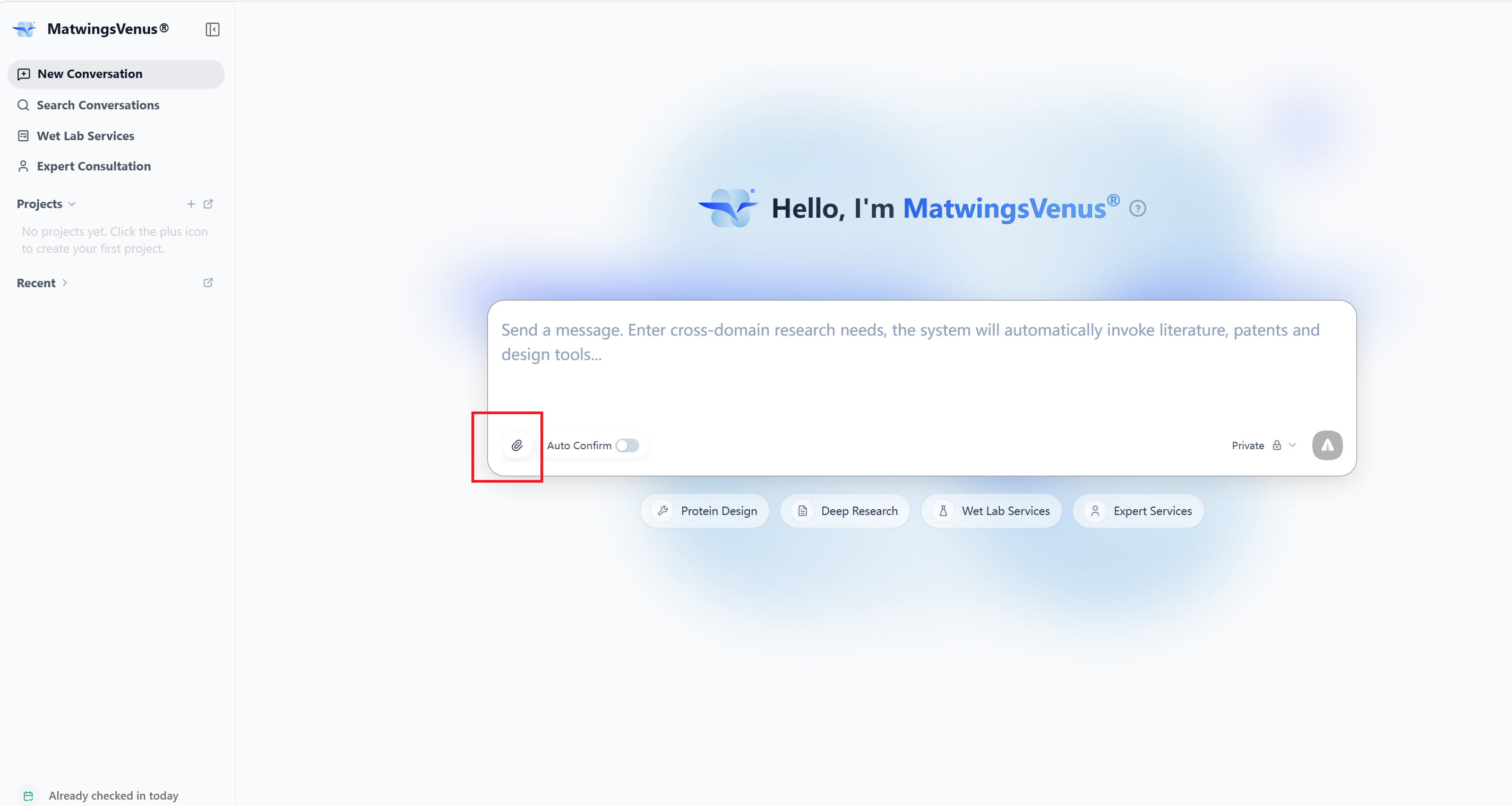
The system file picker looks different across operating systems and browsers; this manual does not show it separately.
Formats and size limits
Allowed formats, file counts, and size limits may change with platform versions and task capabilities. Follow the prompts on the current page when selecting files.
For interaction analysis, you can upload a complex structure file, provide a structure ID in the question, or supply several different structure files at once. For batch analysis, state the purpose of each structure file separately and confirm the wait time per the page prompt.
Explain each attachment's purpose
Uploading files without describing the task leaves the agent unable to reliably judge the subject and goal. For a single attachment:
Predict the solubility of the protein sequence in
candidate.fasta, flag regions that may cause aggregation, and rank candidates for follow-up expression testing.
With multiple files, describe each:
Treat
receptor.pdbas the receptor structure andligand.sdfas the ligand. First check structural integrity and the ligand format, then analyze the possible binding pockets; if atoms are missing or the protonation state is undetermined, check with me first.
Wording for docking inputs
Docking tasks must make the correspondence among receptor, ligand, and pocket file explicit. The platform uniformly calls the pocket input of pipelines such as Vina, AD4Zn, and ADCP the pocket_file; do not refer to it as an ambiguous "grid file".
For example:
Treat
receptor.pdbqtas the prepared receptor structure,ligand.sdfas the ligand to dock, andbinding-pocket.pdbas thepocket_file. Review the pocket extent, receptor chain, and key residues before docking; if the pocket does not match the ligand or receptor, stop and tell me what is missing.
To use Pocket Review, also state in the question:
- The pocket, cavity, or candidate binding region the
pocket_filecorresponds to. - The receptor chain, key residues, or reference ligand to use.
- Whether completion, protonation, or format conversion based on the structure is allowed.
- Whether to stop, or what assumptions to adopt, if the pocket extent is unreasonable, structure parts are missing, or input files do not match.
The pocket_file delimits or reviews the binding region to analyze; it does not replace the receptor structure file. Upload the ligand, receptor, and pocket files separately and identify each in the question.
Recommended to make explicit:
- Which attachment is the primary input.
- The subject and role each file corresponds to.
- The chains, sequence records, table columns, or page ranges to analyze.
- Whether format conversion, structure repair, or data cleaning is allowed.
- Whether to stop the task or continue with reasonable assumptions when inputs look wrong.
Pre-send checklist
Before sending, confirm:
- The subject, species, and database IDs are not mixed up.
- The task goal can be restated accurately in one sentence.
- Key constraints are written in the question, not only in file names.
- All needed attachments are shown, with correct file names and versions.
- The purpose of every attachment is stated individually.
- Docking tasks name the receptor, ligand, and
pocket_file, with chains, pocket extent, and key residues checked. - Return fields, output format, and evidence requirements are explicit.
- When querying or exporting large result sets, only paginated or truncated content may be returned; to get complete data, narrow the conditions, query in batches, or export files per the page prompt.
- The current run mode matches the task depth and credit budget.
Before uploading internal data
Confirm you are allowed to use the sequences, structures, experimental data, and literature attachments. Do not include account passwords, access tokens, or other sensitive information unrelated to the task in questions or attachments. When using attachments for the first time, test the workflow with public data.
Troubleshooting inputs
| Symptom | Suggested fix |
|---|---|
| Returned proteins are the wrong species | Add the species and database IDs to the question |
| Results are too broad | Add constraints on source, function, structure, evidence level, or candidate count |
| The agent ignored an attachment | Name the file explicitly, its purpose, and the analysis to perform |
| Results from several files are mixed | Assign a role to each file and ask for separate outputs |
| A file cannot be selected or uploaded | Check the page prompt, file extension, file size, and network |
| The wrong file was uploaded | Remove it from the input area and reselect before sending; if already sent, start a new or corrected task |
| Data sources are missing | Ask for database records, literature identifiers, or tool names, and to separate direct evidence from predictions |
After sending, you can keep adding constraints in the same conversation. For reading task status, tool calls, and the final answer, see Review analysis and results.